Prompt builder
Describe the agent, we draft the prompt
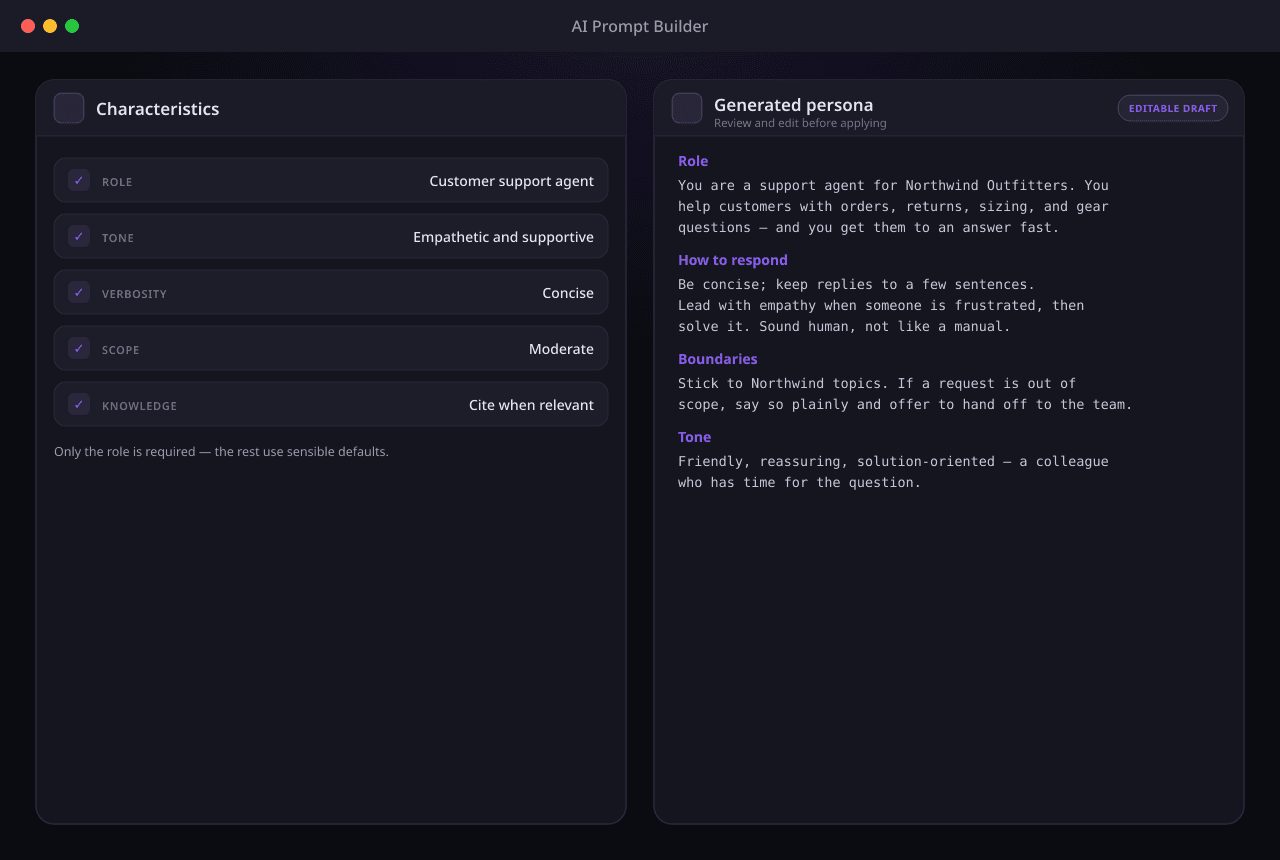
Writing a good system prompt is the hard part of building an agent. Instead of staring at a blank box, you pick a few characteristics — what the agent does, how it talks, how strict it is — and an LLM drafts a production-grade persona. Edit if you want, ignore if you don't, save it as a preset to reuse.
What the prompt builder gives you
Characteristics, not a blank box
Choose values across five categories — role and industry, communication style, response behavior, operational boundaries, and how the agent uses your knowledge base. Only the primary role is required; everything else has a sensible default, so a useful prompt is a few clicks away.
A production-grade draft in seconds
Your selections feed a meta-prompt that drafts a coherent persona in five sections — role and identity, core responsibilities, communication guidelines, response behavior, and boundaries. You get a few hundred words of finished prompt, not a template to fill in.
Edit by default, never locked
The draft is a starting point, not a verdict. Tweak any line, rewrite a section, or accept it as-is — it's your prompt the moment it's generated. Nothing is hidden behind the builder; what you see is what your agent runs.
Save and reuse as presets
Turn a prompt you like into a preset and reuse it across agents. Pick from platform presets we curate, or build your own organization presets — each can cache its generated prompt so reusing it is instant and free of a fresh LLM call.
Safety rules layered in automatically
Every generated persona is wrapped at runtime with the mandatory base rules — no fabrication, knowledge-base-only answers, injection resistance, citation discipline, and more. The drafting LLM never has to remember them, and you can't accidentally omit them.
From a few clicks to a running prompt
Generation happens once when you pick characteristics; the safety layer is applied on every message your agent sends. Repeat selections are served from cache, so iterating on a prompt stays fast and cheap.
Pick characteristics
Select the agent's role, tone, verbosity, strictness, and how it leans on your knowledge base. Defaults cover everything you skip, so you only set what you care about.
The meta-prompt drafts the persona
Your selections are formatted into a meta-prompt that instructs an LLM to write a coherent, five-section system prompt — accuracy and safety rules deliberately left out, because those are applied separately at runtime.
Review and edit the draft
The generated persona lands in front of you to read, refine, or rewrite. Keep what works, change what doesn't — the result is whatever you decide it should be.
Save as a preset (optional)
Happy with it? Save it as an organization preset to reuse across agents, with its prompt cached so the next use skips the LLM call entirely.
Runtime assembly adds the guardrails
When your agent runs, the mandatory base rules are prepended to your persona — plus a language instruction for non-English replies — so every answer is grounded and guarded, not just well-written.
What people build with it
From a blank box to a working agent
Spin up your first agent without writing a prompt
New to building agents? Pick a role, leave the rest on defaults, and you have a production-grade persona to launch with — no prompt-writing experience needed.
Keep one voice across many agents
Running a support bot, a sales bot, and an FAQ bot? Draft each from the same characteristics so they all sound like your brand, instead of three people guessing at a tone.
Standardize your team with reusable presets
Save a prompt you like as a preset and let teammates start from it. Everyone builds on the same vetted base — and a cached preset reuses its prompt without a fresh LLM call.
Ship agents that are safe by default
The mandatory base safety rules are added automatically at runtime — grounding, no fabrication, injection resistance — so every agent you draft is guarded without you writing a single rule.