Human handoff
When AI reaches its limit, a human steps in
Some conversations need a person. Your agent recognizes the moment, escalates to a real inbox, and a teammate picks up the thread with full context — then resolves it back to the AI when they're done. The user never has to repeat themselves.
See a handoff happen
From the customer's side
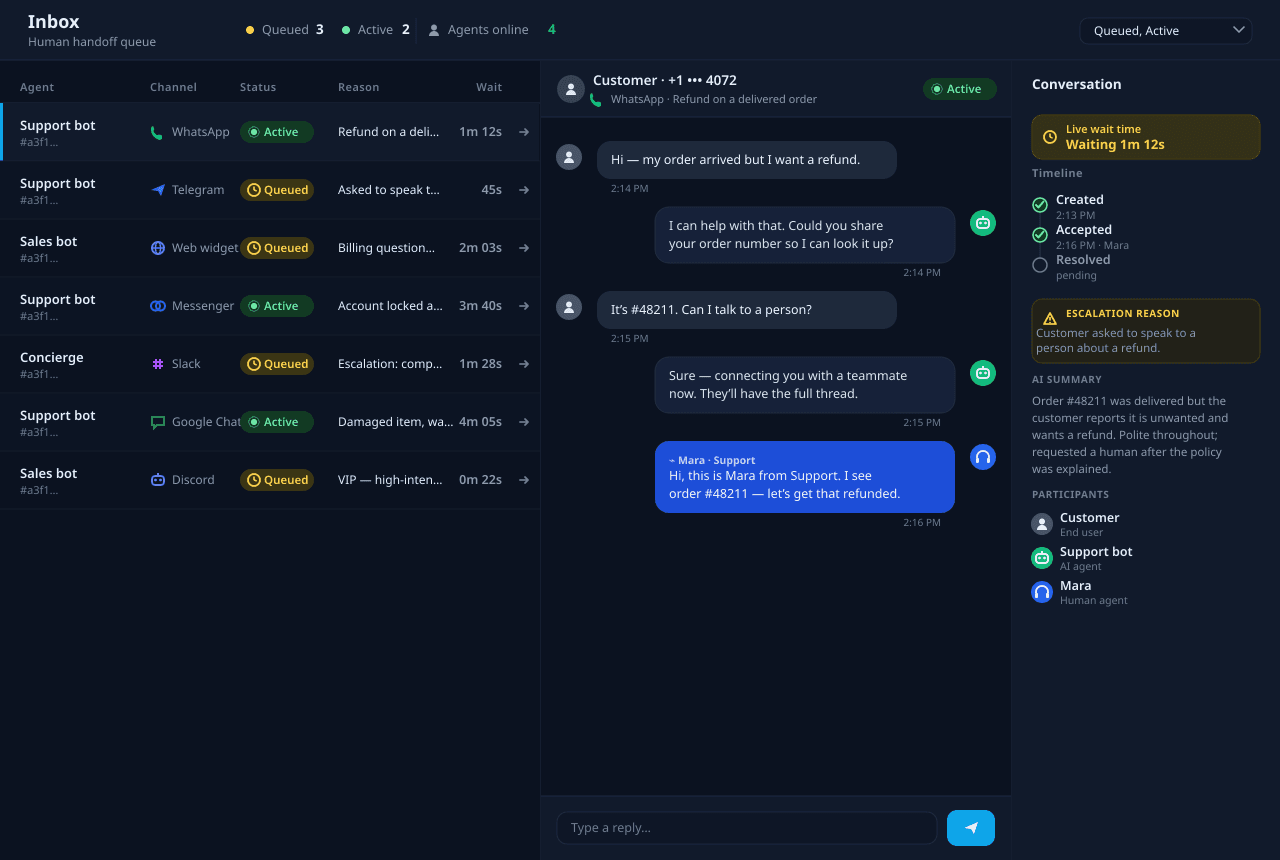
This is what a handoff looks like to the person you're helping — they ask for a human, and one shows up with the whole thread.
Support team
Set up handoff for your team
Set up handoff for your team
What the handoff flow gives you
Escalate on genuine intent
When a user asks for a human, the agent triggers a handoff instead of guessing an answer. A cheap classification guard double-checks the request first, so a stray phrase never drags a conversation out of automation by mistake.
A real-time queue
Every waiting conversation lands in a shared inbox with status, channel, and an AI-written summary of what's happened so far. Your team sees who's waiting and for how long — and presence pings show which teammates are online to take them.
Live chat with full context
When a teammate accepts, they pick up the whole conversation — not a cold transfer. Messages flow in real time both ways, so the reply reaches the user on whatever channel they started on, and the user never repeats themselves.
Every channel, one inbox
Telegram, Discord, Slack, Meta, WhatsApp, Google Chat, and the web widget all route into the same place. Your team answers from one screen; each reply is delivered back on the user's own channel automatically.
Nobody left waiting
If no one picks up within a few minutes, the team gets an email reminder; if a session waits too long, it auto-expires gracefully and returns the user to the AI with a clear message instead of leaving them hanging.
Scoped, controlled, and tier-aware
Every queue and message is scoped to your organization, with role-based access for who can view versus accept and reply. Handoff can be turned on per agent, and availability follows your plan tier.
From AI to human and back
A handoff is a round trip, not a dead end. The agent escalates, a teammate takes over, and resolving returns the conversation to automation — with the user carried along on their own channel the whole way.
User asks for a human
Mid-conversation, the user requests a person. The agent recognizes the intent rather than forcing an answer it isn't confident about.
Guard & escalate
A lightweight classification check confirms the request is genuine, then the conversation is escalated and a queued session is created with an AI summary attached.
Queue & notify
The session appears in the team inbox and an in-app notification fires instantly; if no one accepts within a few minutes, an email reminder follows.
Accept & chat live
A teammate accepts and chats with the user in real time. Replies are delivered back on the user's original channel — Telegram, WhatsApp, the widget, wherever they started.
Resolve back to AI
When the issue is handled, the teammate resolves the session and the conversation returns to the AI agent — or auto-expires gracefully if it was never picked up.
Where handoff earns its keep
Built for the moments AI shouldn't handle alone
After-hours and overflow
The AI covers the front line around the clock and only pulls in a person when one is needed — so a busy hour or a midnight question never leaves a customer stuck.
Complex or sensitive cases
Refunds, account problems, anything delicate — the agent recognizes when judgment matters and routes it to a teammate instead of guessing.
Multi-channel support teams
Telegram, WhatsApp, Slack, the web widget and the rest all land in one inbox, so a small team answers everywhere from a single screen.
High-intent moments
When a conversation clearly wants a human — a careful buyer, an upset customer — a person can step in fast and pick up exactly where the AI left off.